Boolean Search, Algorithm Updates, Company Page Changes & Premium Plans
1. Why LinkedIn Boolean Search Is Becoming Essential
LinkedIn search is increasingly moving toward AI-driven functionality. The filter options that are still visible today will gradually disappear. That’s why it’s becoming crucial to master Boolean search. A simple search for terms like “Sales Director” or “Marketing Manager” often returns thousands of results that are only partially relevant—including junior roles, agencies, freelancers, or profiles from completely different industries.
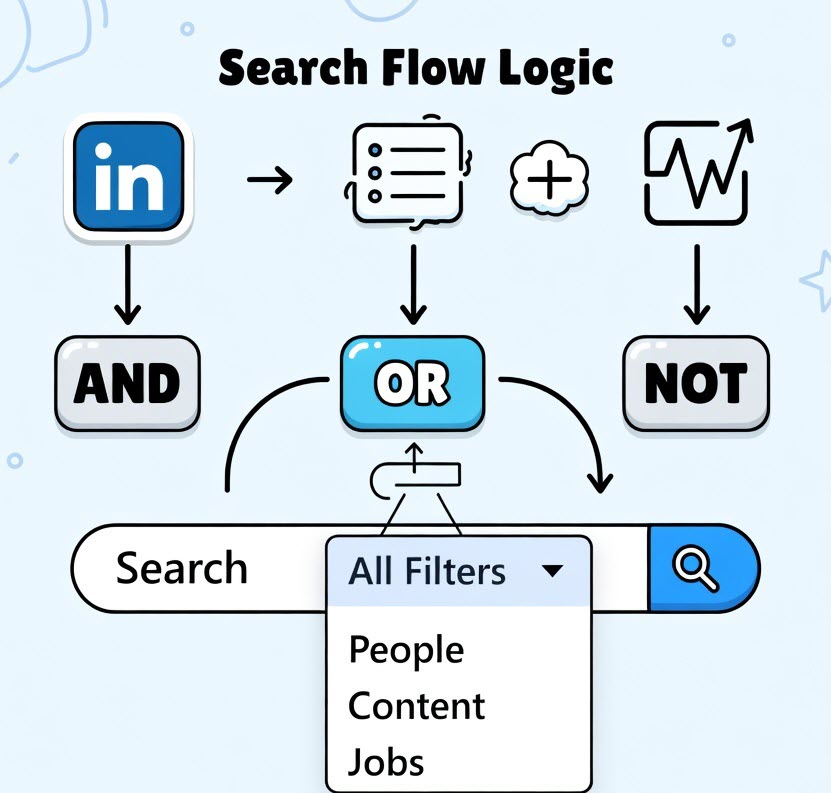
With Boolean search, you get better results by using these techniques:
- “Quotation marks” → exact phrase → “Content Marketing” finds this exact combination of words in this order → without quotation marks, it would also find “content” and “marketing” separately
- (parentheses) → grouping & more complex logic → (Python OR Java) AND Developer NOT Junior → first selects Python or Java → then combines with Developer → excludes Junior
- AND: Combine the exact skills, tools, and experience you truly need (e.g., “Enterprise Sales” AND “SaaS” AND “Salesforce”).
- OR: Expand your search intelligently with synonyms and title variations (e.g., “Account Executive” OR AE OR “Business Development Manager”).
- NOT: Consistently exclude everything that doesn’t fit (NOT Agency, NOT Intern, NOT “VP” when searching for mid-level roles).
This method is especially valuable in sales and marketing because:
- Job titles are highly diverse and often not standardized (“Growth Hacker,” “Demand Generation Lead,” “Head of Revenue” instead of the traditional “Sales Manager”).
The result: 5–10x higher result quality, significantly less time spent, better lead quality, and often the decisive advantage between a well-filled pipeline and barely relevant results.
Even in 2026, despite advanced AI-powered search features, Boolean search remains the most powerful tool for sales and marketing professionals who want to work efficiently and precisely. Without it, you get lost in the noise—with it, you find the right needle in the haystack instantly.

2. How the LinkedIn Algorithm Selects Your Feed
The LinkedIn feed is the page you see when you open LinkedIn. It displays posts from people, companies, or topics you follow. To prevent you from seeing thousands of posts, an algorithm decides which content is most relevant to you.
1. LinkedIn collects content from your network – first, LinkedIn gathers posts from:
- Your connections
- Pages or companies you follow
- People outside your network who might be relevant to you
This can quickly result in thousands of potential posts.
2. A filter removes unsuitable content – before anything appears in your feed, LinkedIn filters out content that:
- Might be spam
- Violates guidelines
- Is likely not relevant to you
This significantly reduces the number of posts.
3. The algorithm evaluates relevance – next, LinkedIn ranks each post based on several factors, such as:
- Connection strength: How closely are you connected to this person? (e.g., did you subscribe to their notifications?)
- Engagement: Are many people liking, commenting, or sharing the post?
- Interest: Have you interacted with similar content in the past?
- Recency: How new is the post?
The higher the score, the higher the post appears in your feed.
4. A personalized feed for every user
That’s why every person sees a different LinkedIn feed. Even if two people follow the same connections, the order of posts can vary.
5. What this means for LinkedIn users – for entrepreneurs, sales, and marketing professionals, this is especially important:
- Posts need to be relevant and engaging
- Comments and discussions increase visibility
- Content from people with strong networks is shown more often
The more engagement a post receives, the higher the chance it will spread across the network.
✅ In short: LinkedIn does not simply display all posts. The algorithm aims to show each user the most interesting and relevant content from their network – and beyond.
Source: https://www.linkedin.com/blog/engineering/feed/engineering-the-next-generation-of-linkedins-feed and https://zenodo.org/records/17976861

3. Fewer Invitations for LinkedIn Company Pages – What does this mean for your page growth?
LinkedIn has introduced an important change to the invitation options for company pages. Many page administrators have already noticed it: the number of free invitations has been significantly reduced.
Instead of the previous 250 invitations per month, administrators of free company pages now have only 50 invitations available per month. In contrast, pages with a premium company profile receive a much larger allowance of 300 invitations per month.
However, the basic rules remain the same: invitations can still only be sent to your own contacts. The available invitation credits are reset monthly, and unused invitations expire. If an invitation is accepted, the corresponding credit may be partially restored.
Quality over quantity
The reduced number of invitations means administrators need to think more carefully about which of their contacts truly belong to the target audience of the company page. It is particularly effective to invite people who already have a connection to the company—such as customers, business partners, industry contacts, or event participants.
Organic growth becomes more important
At the same time, another trend is becoming even more relevant: organic reach and community building. Successful LinkedIn pages today grow primarily through content that is relevant to their target audience.
This includes, for example:
- Regular expert posts that provide real value
- Encouraging employees to actively share content with their own commentary
- LikedIn newsletters or events
The more content encourages interaction, the higher the chance it will be distributed across the network.
The reduction in invitations is noticeably changing how free LinkedIn company pages are managed. For many companies, this means: use invitations more strategically while placing greater emphasis on content, interaction, and community.
Because sustainable growth on LinkedIn does not come from sending as many invitations as possible—but from relevant content and genuine relationships within your employees’ networks.
💬 How are you handling the new limitation?

4. LinkedIn Premium – Is It Really Worth It?
This is a question I hear more and more frequently in my LinkedIn trainings: Do I now need a Premium membership to use LinkedIn effectively?
For a long time, my answer was clear. For most of my participants, a free LinkedIn membership was completely sufficient to network successfully, gain visibility, and build new connections.
But in recent years, something has changed. Many features that used to be standard have been gradually restricted—often very quietly and without major announcements. Month by month, small changes have been introduced that are barely noticeable at first in everyday use.
One example is connection requests with a personal note. In the past, these could be sent without limits. Then the number was reduced to 10 per month, later to 5 and currently, only 3 personalized invitations per month are allowed.
Another example concerns profile visitors. Here too, the information available in the free profile has been reduced over time. Initially, we could see significantly more profile visitors, but the number has gradually decreased. Today, only a very limited number of visitors are shown in the free account and even those are sometimes hidden further down in the profile section.
Of course, it’s clear why LinkedIn is taking this approach. The platform is evolving and placing a stronger focus on premium offerings.
At the same time, I often notice that it’s not easy to keep track: Which Premium options are actually available? How much do they cost? And most importantly, which features do they really include?
That’s exactly why I took a closer look and created a multi-page overview of LinkedIn Premium memberships. It includes not only the current pricing, but also a structured breakdown of the key features and differences between the various options.
If you’d like to receive this overview, I’d be happy to share it with you. You don’t need to comment a “keyword” to boost my reach 😉
Just send me a direct message, and I’ll forward the document to you. This works even if we’re not connected yet ➡️ simply click “Message” on my profile.
And of course, I’d also love to hear about your experience: are you already using LinkedIn Premium? Or are you still working successfully with the free version?
I’m looking forward to your perspective.