LinkedIn-connected apps, Google rankings, AI recognition & alt text
1. LinkedIn Connected Apps: Are Tools Now Becoming Proof of Competence?
LinkedIn is expanding profiles with a new feature: Connected Apps. But what’s behind it – and what real value does this feature add to your personal visibility?

LinkedIn is increasingly evolving from a digital CV into a platform where professional competencies become visible and verifiable. With the new “Connected Apps” feature, LinkedIn is taking a further step in this direction.
Users can connect selected third-party tools to their LinkedIn profile, making certain skills visible. The current list ranges from AI and content tools to presentation and automation software, right through to CRM, coding and language-learning apps.
These include, for example, Buffer, Gamma, HeyGen, Descript, HubSpot, Lovable, Replit, Duolingo, Relay. Profound and various JetBrains development environments. What’s the idea behind it? Until now, anyone could write on their LinkedIn profile: “I’m proficient in Tool XYZ.”
With Connected Apps, this becomes a more concrete signal: “I actually use this tool.” LinkedIn can draw on information about how a given tool is used and generate a description of the corresponding competence in the profile. For particularly active users, additional indicators of usage may appear. This is interesting because it changes the way we present our digital skills on LinkedIn.
The advantages: Why Connected Apps are worth attention
1. More credibility for digital skills
Especially when it comes to AI and software knowledge, it’s difficult to judge how well someone actually masters a tool. A self-declared “AI expert” says very little on its own. A connection to a tool that’s actually being used can at least serve as an additional signal of practical experience.
2. Skills become more concrete
“Digital Marketing” or “Artificial Intelligence” are very general terms. A profile showing concrete applications like Buffer, Gamma, HeyGen or HubSpot conveys much more quickly what someone actually works with. This can be particularly relevant for freelancers, consultants, and marketing and sales professionals.
3. Interesting for personal branding
Anyone who regularly works with certain tools can use this to sharpen their personal competence profile. Especially with new technologies, the question quickly arises: Who’s just talking about AI – and who’s actually working with it? Connected Apps can serve as a further element of personal proof of competence here.
4. Potentially interesting for recruiters and clients
For employers and clients, it can be helpful to quickly identify which digital tools a candidate or service provider uses. This obviously doesn’t replace references, work samples or professional experience. But it can be an additional piece of the puzzle.

The disadvantages: Where caution is advised
1. Tool usage doesn’t automatically mean competence
This is, to me, the most important point. Just because someone uses an app doesn’t mean they’ve mastered it professionally. Trying a tool once and using it productively every day are two entirely different things. Usage ≠ competence. Connected Apps should therefore not be mistaken for a certification or qualification.
2. Profiles can quickly look overloaded
Connecting 15 or 20 apps to your profile doesn’t automatically create more competence. On the contrary: too many tools can make a profile look arbitrary and cluttered. Personal branding works better when it’s clear which skills are genuinely relevant to your target audience.
3. Pay attention to data protection and data sharing
With every connection between LinkedIn and a third-party app, it’s worth checking which data and permissions are being shared. Before simply clicking “Add”, it’s worth taking a look at the respective privacy and permission notices. Because the question shouldn’t only be: “What do I get out of this connection?” But also: “What data am I giving away in return?”
4. The significance depends on the specific tool
For a professional CRM, a development environment, or a specialised business tool, the information can indeed be interesting. For a widely known, general application, the significance may be lower. What matters is always the context in relation to one’s own professional profile.
Who benefits most from this feature?
I see Connected Apps as particularly relevant for four target groups:
📍 Sales & Marketing: For example, HubSpot, Buffer, or other professional marketing and automation tools.
📍 Content Creators: For example, HeyGen, Descript, Captions or Pictory.
📍 AI Users: For example, Gamma, Lovable, Replit or other AI-based applications.
📍 Freelancers & Specialists: If certain tools are an important part of one’s daily work, they can complement the competence profile.
Connected Apps are an interesting extension to the LinkedIn profile – but no substitute for genuine proof of competence. I would therefore use the feature strategically rather than simply adding as many apps as possible.
Ask yourself before connecting: ✔️ Do I actually use this tool regularly? ✔️ Is it relevant to my professional position? ✔️ Does it support my personal positioning? ✔️ Is the connection interesting for my target audience? ✔️ Am I comfortable with the data being shared?
If you can answer “yes” to these questions, the feature can offer real added value.
Because LinkedIn is moving in a further direction with this: no longer just “What do I claim about myself?” – but increasingly “Which digital skills can I make visible?”
And that’s exactly what will become increasingly important in the age of AI. Because in future, the question won’t just be whether someone uses AI – but how well, and for what
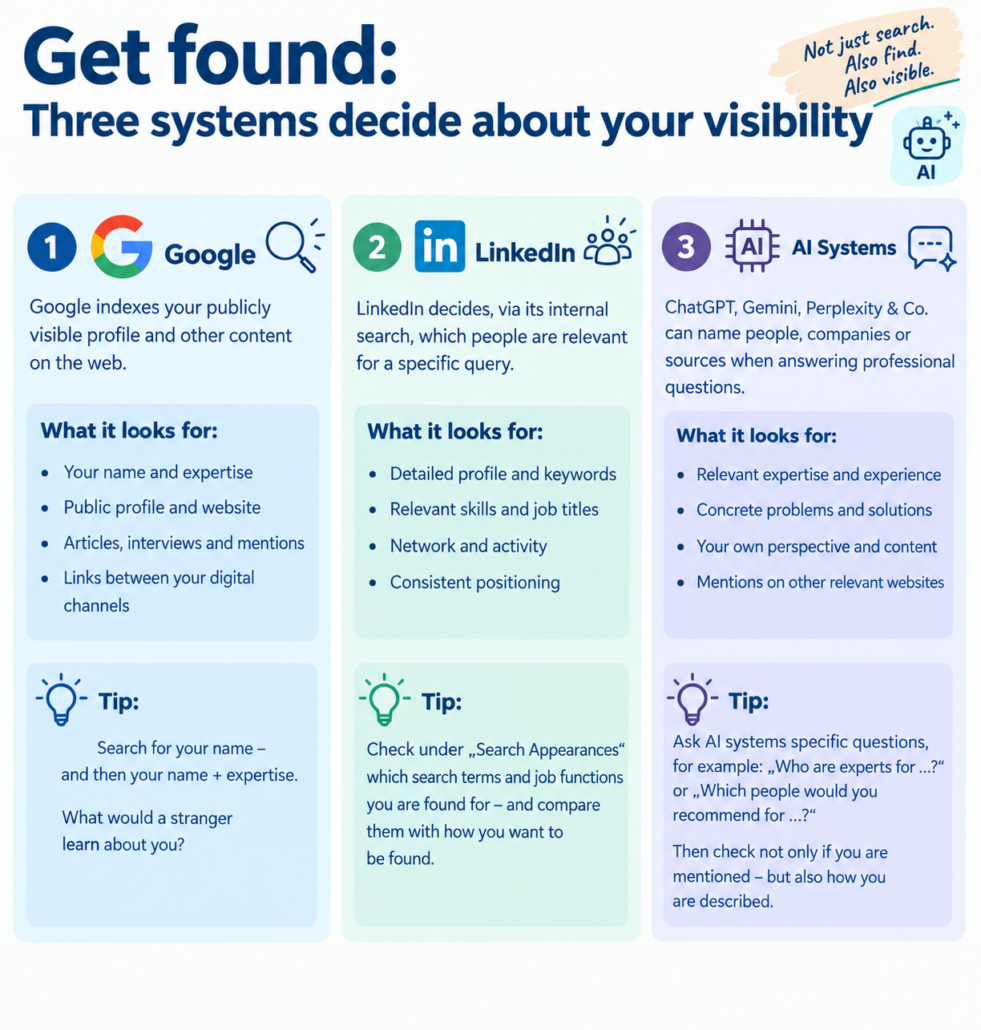
2. Being Found: Three Systems Determine Your Visibility
You’re visible on LinkedIn. But are you actually found? That sounds like the same problem – but it isn’t. When someone searches for your expertise today, at least three different systems can come into play:
1. Google (or other search engines) Google evaluates your publicly visible profile and other content across the web.
2. LinkedIn LinkedIn’s internal search determines which people appear relevant for a specific query.
3. AI systems ChatGPT, Gemini, Perplexity & co. can name people, companies or sources in response to specialist questions.
The crucial point: these three systems work differently.
An example: let’s take a CEO running a mid-sized energy company. His LinkedIn profile might read: Max Beispiel CEO at Energie Beispiel GmbH
That makes it clear who he is and what position he holds. But what happens when someone searches for: “CEO of an energy company with expertise in renewable energy” or: “Experts on the energy transition in mid-sized businesses” or: “Entrepreneurs speaking about decentralised energy supply”?
Now it gets interesting. Because “CEO” alone doesn’t describe his professional positioning. If his profile and content also feature terms such as
- renewable energy
- energy transition
- decentralised energy supply
- energy storage
- sustainable energy
- energy efficiency in mid-sized businesses
and these topics are regularly linked to his own specialist content, a considerably clearer digital profile emerges.
1. Google: What does this person stand for online?
Google needs to be able to recognise who the person is and which expertise is associated with them. A good test => search for: “Max Beispiel” and then: “Max Beispiel renewable energy”
What comes up? What would a potential client, journalist or business partner learn about this person?
2. LinkedIn: Which search terms bring them up?
LinkedIn search operates using its own relevance signals and personalised results. That’s why there’s no single, fixed “position 1”. The CEO shouldn’t therefore appear only as CEO | Energie Beispiel GmbH.
His profile should also reflect his specialist topics and his positioning.
For example: CEO | Energy Transition | Renewable Energy | Decentralised Energy Supply | Energy Storage | Company Name
This doesn’t mean cramming in as many keywords as possible. It’s about clear and credible signals.
3. AI: Is the person recognised as an expert?
Things get even more interesting when it comes to questions put to AI systems: “Which experts focus on the energy transition in mid-sized businesses?” Or: “Which CEOs in the energy sector write about decentralised energy supply?”
Here, the position “CEO of an energy company” may not be enough on its own.
AI needs specialist reference points. Regular posts, articles, interviews, publications and mentions on other relevant websites can help link a person to specific topics. Your profile says who you are. Your content shows what you stand for.
Your 20-Minute Visibility Check
- 5 minutes: Google Search for your name, and then for “Name + expertise”.
- 5 minutes: LinkedIn Search for your three most important specialist terms. Where do you appear?
- 3 minutes: Analytics Check your “Search Appearances”.
- 7 minutes: AI Ask, for example: “Who are experts on [your field] in the German-speaking world?” and “Which people would you recommend for [a specific problem]?” Don’t just check whether you’re mentioned. Also check how you’re described.
Your digital visibility isn’t just made up of reach, likes and followers. It comes down to three steps:
- being found
- being understood
- being recognised as relevant
So rather than only asking “How do I get more reach?” – ask “If someone searches for my expertise today, can they actually find me?” Because that’s exactly where real digital visibility beginns.

3. A small field in LinkedIn posts is surprisingly often overlooked: “Alt text”
And no: it’s not just there for SEO. Its most important purpose is accessibility. People using a screen reader receive, via the alt text, a description of what’s visible in your image. LinkedIn itself therefore recommends adding meaningful alt text to images.
Funnily enough, I couldn’t set an “alt text” on a post today – the system immediately kicked me out of the post… though of course, that could just as easily have been a browser issue… perish the thought…
Not: ❌ “Image”, ❌ “Conference”, ❌ “Infographic”
But rather => “Speaker presenting to a group of sales staff on the topic of xyz.”
Describe what’s visible and which information is relevant to understanding your post. If the graphic contains important text, this should also be included. And what about reach? LinkedIn confirms that its feed systems take into account many signals from profile, network, activity and the context of a post.
However, there is currently no official statement from LinkedIn saying that filling in alt text automatically increases your reach. But as a 20-second step towards more accessible and more professional communication, it’s absolutely worth recommending.
After uploading an image, you can select “Alt text” on LinkedIn and add your description. Make alt text a routine. Not for the algorithm. For the people who might otherwise not be able to fully perceive your content.