Staff verification, video posts and AI-detected posts
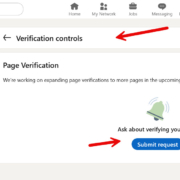
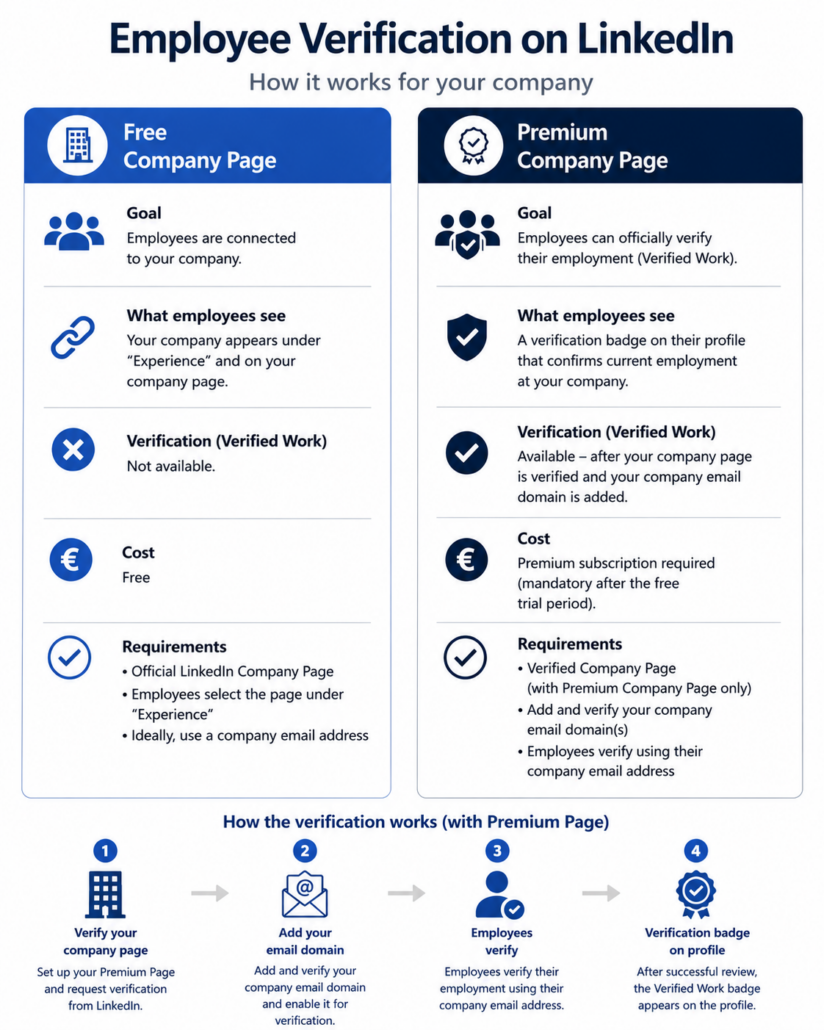
1. Employee verification via your Company Page – now only with PREMIUM!
The pressure to get verified on LinkedIn is growing massively. Many people feel uncertain and want to verify themselves via their employer email address. Unfortunately, LinkedIn has also pulled the paid lever here. In my April newsletter, I gave a detailed overview of the “Persona” verification process. If you have not read it, here is the link. It is important that you understand where your data goes.
Now LinkedIn has made the verification process even harder. You need a PREMIUM Company Page in order to offer your employees the simple verification process – and no, it is not available in the free trial month.
Before you decide to upgrade, you should check whether employee verification actually provides added value for your company. For many small and medium-sized businesses, a professionally maintained Company Page combined with complete employee profiles is already sufficient to create a serious and trustworthy presence. Employee verification is still “voluntary”. Anyone who cannot verify via an employer email address has to decide for themselves whether to hand over their data and to whom.
Are you already using the potential of your LinkedIn Company Page – or are you planning an upgrade? Feel free to share your experiences in the comments.

2. LinkedIn Videos: The Most Important Do’s & Don’ts for Greater Reach
Videos are once again among the most effective content formats on LinkedIn. They build trust, showcase your personality, and often generate significantly more engagement than text-only posts. If you’re planning to create LinkedIn videos, here are the key rules you should follow.
✅ Do’s
1. Start with a strong hook.
The first three seconds determine whether people keep watching. Begin with a question, a surprising statement, or a specific problem your audience can relate to.
2. Use the vertical format (9:16).
Most LinkedIn users watch videos on their smartphones. Vertical videos make the best use of the available screen space.
3. Keep it short.
In most cases, 60–90 seconds is enough. Get to the point quickly and focus on one clear message.
4. Add subtitles.
Many people watch videos without sound. Subtitles improve watch time, accessibility, and comprehension.
5. Keep text within the safe zone.
Avoid placing text or logos too close to the top or bottom of the screen, as these areas may be covered by LinkedIn’s interface on mobile devices.
6. Write a compelling caption.
A video alone isn’t enough. Explain why it’s worth watching and encourage your audience to join the conversation.
❌ Don’ts
❌ Don’t use long intros or animated company logos.
❌ Don’t neglect lighting or audio quality.
❌ Don’t read PowerPoint slides to your audience.
❌ Don’t overload your videos with too much text.
❌ Don’t strive for perfection. Authenticity wins every time.
What Type of Content Performs Best?
- Practical tips and expert advice
- Behind-the-scenes insights
- Customer success stories and case studies
- Common mistakes in your industry
- Answers to frequently asked customer questions
- Industry news and emerging trends
People don’t buy products first—they buy trust. Video is one of the most powerful ways to build that trust.
Repurpose the Content You Already Have
You don’t need to create every video from scratch. Turn your existing content into short LinkedIn videos, such as: Presentations, Webinars, Podcasts, Meetings, Customer conversations, Interviews
With minimal effort, one piece of content can become multiple engaging LinkedIn videos.
🎯 Don’t aim for perfection—aim to provide value. It’s far better to publish helpful videos consistently than to spend months waiting for the “perfect” video.
What has been your experience with LinkedIn videos? What type of video content performs best for you? I’d love to hear your thoughts in the comments.

3. Before AI recommends you: How to make your LinkedIn posts relevant for AI/SEO
Many B2B decision‑makers no longer search only on Google or directly on LinkedIn – they ask their questions to AI systems. If your content does not appear there, you may never be considered, even though you offer exactly the right solution.
So, ask yourself five questions for every post:
Is it public? Open your post in a private browser window and check whether it can be read without logging in.
Is it discoverable? Search for the first line plus your name in a search engine – if your post does not show up, it will also be difficult for AI. (Are you visible in search engines? What do your settings look like?)
Is it understandable? Is it clear within 10–15 seconds which specific question you are answering and for which role or industry you are writing?
Is it credible? Link your statements to project experience, typical client cases or concrete results instead of sharing opinions only.
Is it citable? Formulate at least one clear definition, distinction, checklist or framework that could be used directly inside an answer.
Your next step: Choose one core question your ideal B2B clients would ask an AI today (for example, “How can we reduce onboarding times in sales?”). Write a well‑founded article on it – then publish 2–3 focused posts that each clearly answer one aspect of that question. Revise your profile so that your industry, target clients and concrete value are obvious at a glance. After a few weeks, ask the same question again in several AI tools and see whether content like yours appears – and where there are still gaps.
Which single concrete question do you want to answer so clearly from tomorrow on that both your clients and an AI immediately recognize: “This is exactly what you stand for”?