LinkedIn Premium: new features and pricing, spring clean, consequences of using comment bots
1. Time to clean up your LinkedIn network: Why you should do it now!

In the hustle and bustle of everyday working life, we often forget to maintain our network – much like a wardrobe overflowing with unnecessary clutter. An unstructured LinkedIn network can limit your reach, confuse the algorithm and even pose risks. But: targeted tidying up brings clarity, better recommendations and real added value. Based on my experience and best practices, I’ll share with you mistakes, risks and benefits – plus a simple 3-step plan.
Common mistakes when tidying up your network – Many people stumble here:
• Being too radical: Deleting everything at once without checking – this can cause your visibility to plummet in the short term, as LinkedIn aligns its algorithm with active connections.
• Using automated tools: Third-party software for mass deletions carries the risk of shadowbans or even account suspension – LinkedIn hates this!
• Emotional decisions: Removing contacts out of frustration without considering the long-term benefits.
Risks you should be aware of
• Loss of reach: Open or inactive contacts signal inactivity to the algorithm, which means your posts are pushed less.
• Security flags: Too many deletions in a short period of time arouse LinkedIn’s suspicion and could temporarily restrict your account.
• Missed opportunities: A person who seems inactive today could become relevant tomorrow – double-check!
The advantages of a clean network
Believe me: quality beats quantity. After cleaning up…
• …your reach will increase as the algorithm makes more relevant recommendations (e.g. jobs, groups).
• …your network becomes a real asset: more interactions, better leads and more targeted networking opportunities.
• …you feel more professional – a focused network radiates seriousness and helps seekers find you faster.
How to clean up your network: my 2-step plan – Take 30 minutes – it’s worth it!
1️⃣ Withdraw unanswered connection requests Open requests have a negative impact on your reach because they ‘clog up’ the algorithm. And if there is no interest, that is also an answer. Go to ‘My Network’ > ‘Connection Requests’ and simply withdraw them. Tip: Prioritise requests with personalised messages.
2️⃣ Go through your contacts & remove inactive ones Scroll through your connections (under ‘My Network’ > ‘Connections’). Ask yourself these questions: Is the person reputable? Do they have a clear profile picture? Have they been active in recent months (e.g. posts, comments)? How large is their network? Remove inactive or irrelevant contacts – but only after briefly reviewing their profile.
A clean network is like a well-organised toolbox: it makes you more efficient and successful. Have you ever cleaned up your network? What experiences would you like to share with me in the comments?
I look forward to hearing your thoughts! 👇
2. LinkedIn has rolled out an analytics upgrade for premium profiles.

You can now see the following directly in your profile analytics:
• Impressions of your profile
• Clicks on your profile
• Average viewing time
• Impressions and clicks per profile section (info, spotlight, activities, work experience, skills, etc.)
This allows you to measure the behaviour of your visitors.
How to use the new analytics in practice
First, analyse which sections receive the most clicks. These are often:
• Your introduction/info
• Services (if you use them)
• Spotlight section and your activities
• Your work experience
What does this mean for you?
• Optimise areas with low traffic
• Further expand areas with high traffic
• Monitor viewing time
• Continue to engage your visitors on a daily basis!
Draw the right conclusion. Do you have high impressions in the ‘info area’ but few clicks, e.g. in the focus area? Then your introduction is strong – but loses relevance as it progresses.
Practical tip: Optimise your profile in a structured manner and change only one variable at a time. Monitor the development of impressions and clicks per area. This will allow you to clearly see which measures are effective.
3. Automated Comments: Why They Are a Problem on LinkedIn

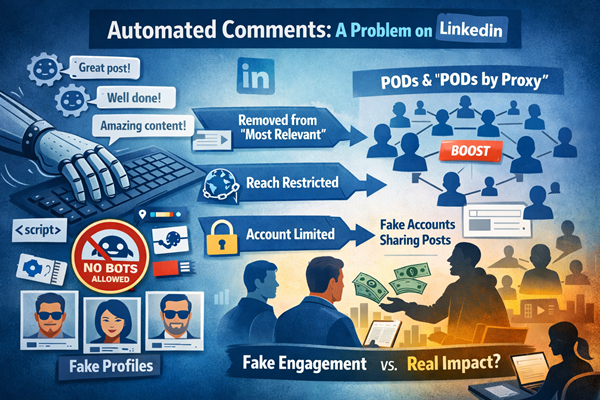
LinkedIn is increasingly taking action against automated comments. These are comments that are not manually written and posted by a person clicking the “Comment” button, but are instead automatically published via browser extensions, scripts, or third-party tools. Such comments violate the platform’s policies and are not permitted.
What Happens Upon Detection?
If an automated comment is identified, measures are implemented step by step:
1. Removal from the “Most Relevant” section – The comment loses its preferred visibility.
2. Reach restriction – It may no longer be displayed outside the commenter’s network.
3. Account restrictions – If automated comments continue to be used, the member’s account may be restricted.
The goal of these measures is to ensure that genuine, authentic comments receive the visibility they deserve—and to encourage more meaningful, real conversations.
The Connection to PODs and “PODs by Proxy”
Automated comments are often an indicator of so-called PODs (Post Optimized Deception). These are organized groups that systematically boost posts in order to artificially generate reach and engagement.
A newer variation is known as “PODs by Proxy”:
- The actual author does not directly join a POD.
- Instead, they hire a service provider.
- That provider operates its own POD accounts, often fake or hijacked profiles.
- These profiles share the original post (usually without adding a comment).
- This action then triggers automated comments on the original post.
The result is artificial engagement, while the original author maintains plausible deniability and appears formally uninvolved.
A Further Important Step Toward Authentic Engagement
Taking decisive action against automated comments is another important step in effectively curbing artificially created engagement structures such as PODs and “PODs by Proxy.”
This allows genuine content and authentic interactions to regain the space and visibility they deserve. In doing so, the platform can move closer to what it was originally intended to be: a place for real, valuable conversations and sustainable growth.
I always talke about the importance of acting in a personal and authentic manner. Thanks to new technologies in the background, LinkedIn will increasingly restrict or block profiles in future and consistently remove providers of dubious software solutions from the system.
4. New LinkedIn Premium All-in-One (AiO) – the comprehensive premium package

LinkedIn has now officially launched Premium All-in-One(short: AiO) – a powerful premium offering developed specifically for owners and executives of small and medium-sized businesses.
The most important functions from the areas of sales, marketing, and recruiting are bundled into a single package. It combines elements from Business Premium, Sales Navigator Lite, Recruiter Lite, and marketing tools – perfectly tailored for companies that want to grow with limited effort.
Onboarding into the new premium with AI support During the onboarding process, an AI-powered tool analyzes your personal profile, your company page, and your website. This allows the system to better understand your business and your ideal target audiences. You can manually refine the target criteria at any time to receive even more precise tips and recommendations.
Price & key benefits at a glance For $99 per month, you get a strong set of 10 competitive advantages:
- $50 monthly credit to boost your posts (including precise audience filters for your ideal customers) or
- $50 monthly job promotion credit – or $600 credit upfront if you opt for an annual plan
- 15 daily suggestions of qualified prospects, matched to your target criteria (similar to Sales Navigator, but limited to 15 per day; up to 40 profiles can be saved)
- Unlimited search with advanced filters (job function, seniority level, location, company size, years of experience, and more)
- Prospect insights – e.g., recent company changes or shared connections
- AI-generated message drafts to help you reach out to potential customers
- Trending posts from your target audience – see what topics your ideal customers are currently discussing
- Automatic follow invitations for people who engage with your content
- Company spotlight – your company page is prominently highlighted in your profile (in the “Featured” section)
- AI-generated message drafts specifically for recruiting – personalized for candidates, based on the job description, profile insights, and company data
Further Information
- Official overview: https://premium.linkedin.com/small-business/all-in-one
- Help article on Premium All-in-One: https://www.linkedin.com/help/linkedin/answer/a7443857
- Additional details: https://www.linkedin.com/help/linkedin/answer/a7438888
If you already have a Premium version (not Sales Navigator), switching to this new option is definitely worth considering. Pricing may vary in that case. Just take a look – especially for sales and recruiting, the new version with the included credits is a real bonus.