AI settings – LinkedIn visibility – Premium for pages
1. 📌 Important new feature in LinkedIn Back Office – ‘AI’ is now activated!
Have you read your emails from LinkedIn? From 3 November, LinkedIn content will be used to train AI! What caused an uproar last year when this became public knowledge is the real problem with this year’s update: the expansion of the types of data shared with Microsoft from more locations. Although you can opt out, you will still be targeted with advertising, just not the kind that is relevant to you.
What does the new AI training at LinkedIn mean?
Under the new rules, LinkedIn allows the Microsoft subsidiary to collect most data from user profiles, posts and interactions and use it to train generative AI models. The goal: AI should help create better content and support employers in their search for talent.
Read more about it here: https://www.linkedin.com/help/linkedin/answer/a8059228
My recommendation:
Go to your back office and decide whether you want to share this data!
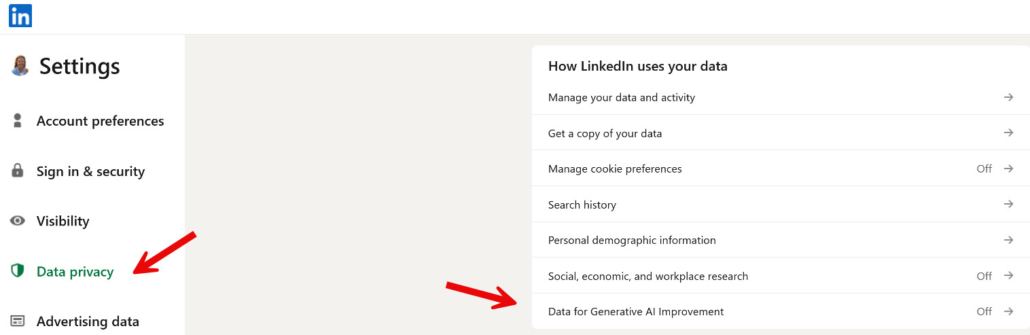
• Go to your profile picture in the top right corner of the main navigation bar and then click on ‘Settings’ ➡️ “Privacy” ➡️ ‘How LinkedIn uses your data’ ➡️ ‘Data for improving generative AI’
• Here you will find the setting ➡️ ‘Use your data to train AI models to create content’.
Important 📍 LinkedIn will no longer provide advance notice
In addition to introducing data usage for training AI models, LinkedIn now reserves the right in its new terms and conditions to no longer provide advance notice of changes to the terms of use when it comes to new products or legal changes, for example. It also clarifies that ‘deepfakes and other unlawful identity fraud’ are not permitted on the platform.

2. Which of your content is visible outside of LinkedIn?
Do you invest a lot of time and effort in creating LinkedIn content, text posts, slideshows, images, and videos to increase your visibility and credibility?
You probably publish posts in the hope that the right people will see your content and contact you. Here’s the problem: what if our customers aren’t active on LinkedIn? What if they use search engines or AI tools to find answers?
Did you know that the only LinkedIn content visible outside the platform is articles and newsletters? These posts are indexed by search engines and now also appear in AI results. Normal posts, even popular ones, remain locked within LinkedIn – and are almost invisible outside the platform.
More and more people are using AI instead of Google to find information. AI provides direct answers without endless results pages. But be careful – AI results can also contain errors. If our content cannot be found by search engines or AI, we are often not visible outside of LinkedIn with our specialist topics.
Therefore, make use of the article and newsletter functions. Be sure to note the following tips:
➡️ Format your text for clarity and readability.
➡️ Add SEO titles and descriptions (top right via settings).
➡️ Embed videos, images, links and mentions.
This will expand your visibility beyond the platform and, over time, achieve search indexing and AI visibility. LinkedIn shields its content. Even parts of our profiles – such as recommendations and reviews – do not appear in external search results. (Try exporting your profile as a PDF to see what’s missing.)
3. Company pages – Premium or not?
LinkedIn removed free page features on 15 October. Now, only pages with a Premium membership can use the following features:
🔷 Monitor 9 competitors (only 1 competitor for basic members), including the 3 most successful posts from the last 30 days.
Added value:
➡️ Keep an eye on relevant topics, including those from competitors.
➡️ See how your follower growth compares.
➡️ Better overview of organic reach.
You can also try the Premium package for 30 days at no cost. After that, you pay approximately € 69,- per month for an annual subscription.
Building up followers for company pages is still hard work, whether with or without Premium. Always bear in mind that pages cannot act like personal profiles. Therefore, you should weigh up your options carefully. You need a good strategy to make good use of the Premium feature.

4. Post boosting (for a fee) for personal profiles
LinkedIn is currently testing how you can promote your personal posts (not just company page posts) for a fee. For self-employed people or brand ambassadors, this could bring more visibility. It remains to be seen what it will cost and whether it will be accepted.